PassTracker
Free in beta · no card
Volleyball stats, courtside

Rate every touch
without losing the rally.

→Serve, pass, hit and dig in one tap. No player picker, and any question after it is one you can ignore.
→Matches run on a live court board: score, rotation, subs.
→A second iPad or laptop says who to serve and where their kills land.
→Nothing to upload. The stats are done when the match is.
Live demo
PASS DISTRIBUTION
3Great10
2Good8
1Poor5
0Error2
2.04
Avg
72%
In-system
25
Passes
2
Errors
7
Jennifer
25 passes
2.04
AVG
↑ tap a rating, everything recalculates live
On match day

Track the match, not just the passes.

MatchThree rallies, logged
One tap per touch, and the board keeps up.
  1. Dani serves. Tap Hard on her pad.
  2. Gia digs, Ava kills. Tap D, then K. The point is ours: 1–0.
  3. They win the next one. Tap +1 Them and the serve changes hands.
  4. Fran passes a 3, Elle kills. A side-out, so the six rotate on their own.

A recording of the app on a phone, not an animation.
MatchLive court board
The six on the floor, with their buttons on them.
Gabrielino 14 Set 1 live We serve 11 Northgate +1 Uskeep serving +1 Themthey take the serve
#9Elle S.P4
Passing
0Error1Poor2Good3Great
Digging
EErrorDDig
Hitting
EErrorHHitKKill
#4Cara S.P3
Passing
0Error1Poor2Good3Great
Digging
EErrorDDig
Hitting
EErrorHHitKKill
#7Ava S.P2
Passing
0Error1Poor2Good3Great
Digging
EErrorDDig
Hitting
EErrorHHitKKill
#15Fran S.P5
Passing
0Error1Poor2Good3Great
Digging
EErrorDDig
Hitting
EErrorHHitKKill
#21Gia S.P6
Passing
0Error1Poor2Good3Great
Digging
EErrorDDig
Hitting
EErrorHHitKKill
#3Dani S.P1
Serving
0Error1Easy2Fair3Hard4Ace
Digging
EErrorDDig
Hitting
EErrorHHitKKill
This is the iPad's board, drawn from the app. Every cell carries a button for every skill that player can be doing right now, so an ace, a dig and a kill are each one tap with nobody to pick first. Win the rally and the six rotate themselves, the score moves and the serve changes hands. After a point you can say how it was scored, by either team, or ignore the question and keep going. A match is divided into sets, and each set keeps its own score, lineup and rotation.
PracticeCourts, not sets
Three nets going at once, three separate groups.
Court 1Court 2Court 3
#4Dani Roth2.31avg
#5Elena Duarte1.94avg
#6Fran Ito2.08avg
A practice gets the card list instead of the court, and the same switcher counts courts rather than sets. Each court holds its own group, so two coaches on two nets tap into two separate lists and nothing collides. The app picks the right board off the session type, so there is no mode to remember.
Four skills, one tap
Serve, pass, hit and dig on the same screen.
Serving · 0–4 Passing · 0–3 Hitting Digging
Side-out
62%
of reception rallies
Dig %
87%
27 digs of 31
Track one skill or all four. Serving runs on five points, from error through easy, fair and hard to ace, so a tough serve that stayed in reads differently from a free ball. Passing is the usual 0 to 3, hitting is kills, errors and attempts, and a dig is a count: Dig or Dig error, with dig percentage on Stats.
StatsThe second screen
Track on one iPad. Read the match on another.
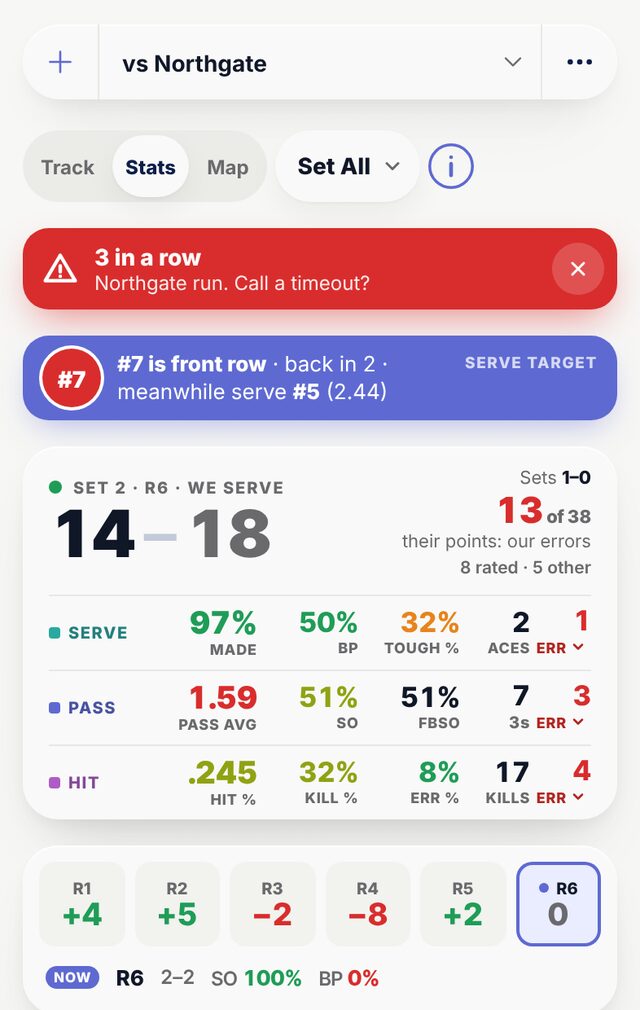
PassTracker's Stats screen mid-match: the score 14 to 18, a 3 in a row alert, the serve target (number 7 is front row, serve number 5 meanwhile), the team card with serve, pass and hit figures, each rotation's plus or minus, and the player table.
Stats logs nothing, so two devices can never double-count a rally, and it refreshes in about two seconds while a match is on. It shows what you cannot read off the court: which rotation is winning points, side-out and break-point rates, every player's serving, passing, hitting and digging, a timeout alert when they run three in a row, and who on the other side to serve next. On an iPad, a laptop or the gym's desktop.

Between sets

When a set ends the app says so: the score, who serves next, and Start set 2 with the same six, or a new lineup.

How every point was scored

Their kills, our errors, aces, blocks: say how a point ended, for either team, and the point log keeps it.

Hand it to an AI

Export for AI writes the whole match as one file for ChatGPT or Claude, every touch in order with its time.

Run your next match on it →
Map

See where their kills land, while the match is on.

Tap where each of their kills landed and who hit it. The Map turns it into where they score, who is doing it, and what to change before the next rotation.
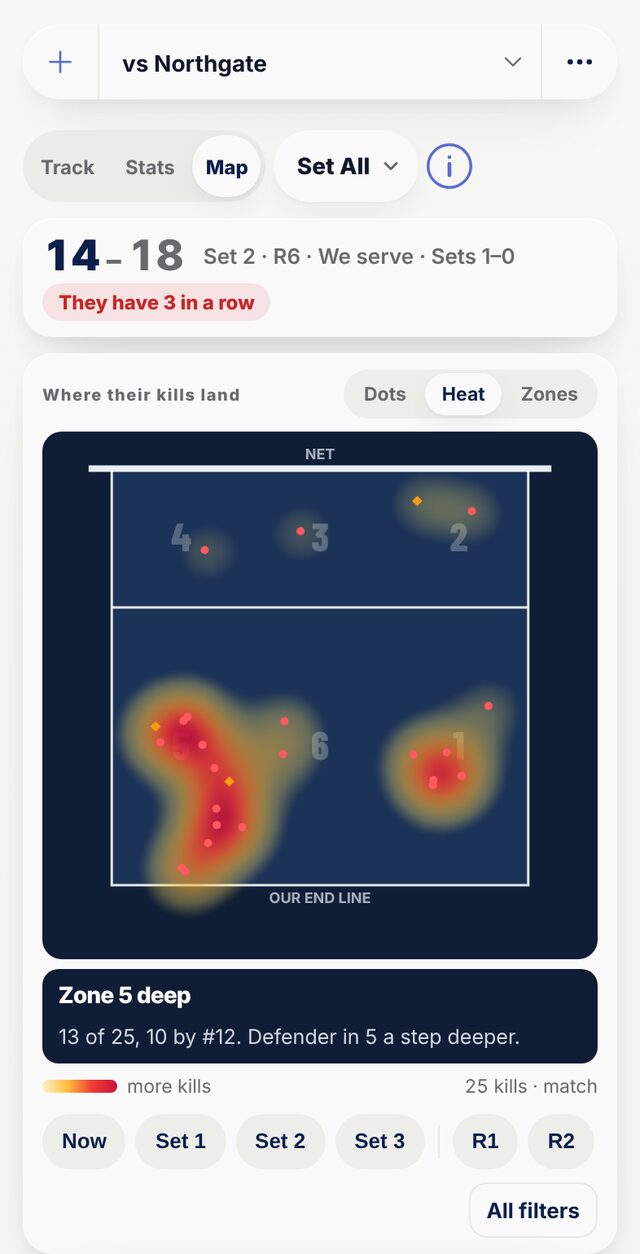
PassTracker's Map: a heat map of the other team's kills on a navy court, hottest in zone 5, with the call Zone 5 deep, their hitters with kills over attempts and where each one goes, and the block call: block and dig zone 5 against number 12.
WhereHeat, dots or zones on the court, and the zone they keep finding called out under it.
WhoTheir hitters with kills over attempts, where each one goes, and who is hot right now.
What to changeA block and dig call, how they score against how we score, and filters by rotation, shot and result.
Opponent scout

Find out who to serve, during the match.

#7
Serve #7 · Ava serving
Passing 1.13 off Ava, aced 3 of 9
#Pass avgAcedAtt
71.1331% in-sys39
22.2567% in-sys16
52.4478% in-sys08
The red circle is your target.
How it works
One extra tap per serve.
After you rate one of your serves, the other team's jersey numbers appear. Tap whoever received it. That is the whole gesture, and it takes itself away if you ignore it.
PassTracker weighs an ace heavier than an out-of-system pass, compares each receiver against the rest of their own side, and marks the one your serve is actually hurting. Stats then says who to serve now, which of your servers has done the damage, and when the target has rotated to the front row, who to serve meanwhile.
Who's behind this

Made by coaches. Your roster stays yours.

Private by default

Your roster is visible only through links you create, and delete whenever you want.

Your data is yours

Export all of it anytime, as a spreadsheet or a full backup file, plus automatic weekly backups.

Made by coaches

Questions go to a coach, not a ticket queue.

Why switch

The clipboard can't keep up.

The old way · Clipboard and tally marks
✕Tally marks for passing, and nothing at all for serving or hitting
✕Averages done by hand, hours or days later
✕No way to tell which rotation is leaking points
✕Nothing to show a parent until someone types it up
With PassTracker
✓One tap per touch: serve, pass, hit or dig, rated as the ball drops
✓Averages, hitting percentage and side-out update during the rally
✓Every rotation scored, so the weak one shows up before the other team finds it
✓A shareable leaderboard link the moment practice ends

Already using a stats app, or film?

What you getClipboardFilm-based statsPassTracker
Stats while the match is onNoNo, after the film is processedYes, as you tap
One tap per touch, no player pickerNo, tally marksNo, tagged from the filmYes
Which rotation is losing pointsNoYesYes, live
Who to serve and where their kills landNoYes, after the matchYes, during it
Something to film, upload and wait forNothingEvery matchNothing
Film to rewatchNoYesNo, keep your camera for that
Your whole staff on one live rosterNoVariesYes, one invite link
Make the switch, it's free →
The payoff

Every touch becomes a story coaches can use.

The moment practice ends, every tap rolls up into a ranked leaderboard and a season-long trend, for each skill you track. No spreadsheets, no typing.

Leaderboard
Ranked automatically, on any skill you track
Sort: Avg
#PLAYERPASSAVG
1Jennifer OH832.04
2Devon L811.83
3Harper OH791.78
4Camila L471.60
5Sage L491.55
Team average trend
Passing average per session, against your goal
2.5 1.7 1.0 Goal 2.2 Jun 21Jun 27Jul 3Jul 9Jul 15
Session avgGoal
At practice, and across the program

Runs the way a gym actually runs.

Multi-court
Every court, one source of truth.
1
Outsides
2
Liberos
3
Setters
+4
Up to 7 courts run at once inside the one session, each with its own group of players, all rolling up to one roster.
Practice vs match
See if it holds up under pressure.
Practice avg
1.86
384 passes
Match avg
1.78
375 passes
Compare practice and match passing side by side to see who rises to game day.
By rotation
Find the rotation that's leaking points.
Passing average by rotation, shown here. Serving, hitting and digging split the same six ways.
R1
2.1
R2
2.0
R3
1.9
R4
1.4
R5
2.2
R6
2.0
Every touch is tagged with the rotation it happened in, in practice and in matches, so the rotation that is giving away points shows up before the other team finds it first.

Parents and the gym TV

One read-only link, no account needed, that updates itself. Open it on the TV between drills.

Teams and roles

Every team in one org. Owner, admin, editor or viewer access, and switch orgs in one tap.

Lineups and liberos

The starting six in serve order, the rotation it opens in, and liberos paired to their middles.

Seasons

Carry your roster into next season; last season stays readable.

Works offline

Every tap saves on the device first and syncs when the gym wifi comes back.

Export and backup

Everything as a spreadsheet or a full backup file, plus automatic weekly backups.

Export for AI

A match as one file for ChatGPT or Claude: every touch in order, with its time.

Phone, iPad or laptop

Install it on a phone or iPad. On a laptop, Stats shows every skill in one table.

You can be tracking in about a minute.

4 STEPS
1

Create your team

School or club. A sample team is there to explore first.

2

Add your players

Type them in, or paste the whole roster at once.

3

Start a match or practice

A match asks for your starting six; a practice puts the team on court 1.

4

Tap

One tap per touch. The stats are done when the match is.

Install

On the bench in one tap.

iPhone and iPad

Open dash.passtracker.app in Safari, tap Share, then Add to Home Screen.

Android

Open it in Chrome, tap the menu, then Install app.

Laptop or desktop

Open dash.passtracker.app. Chrome and Edge offer Install in the address bar.

Questions

Coaches ask us this.

What is a good serve-receive passing average?
Most coaches rate serve receive on a 0 to 3 scale, where 3 is a perfect pass and 0 is an ace, an overpass, or a shanked ball. On that scale a team average around 2.0 is solid at the club and high school level, and 2.3 or higher is strong. PassTracker also shows your in-system percentage, the share of passes good enough to run your full offense.
How does PassTracker rate each touch?
One tap. During the rally you tap the button for the touch that just happened: 0 to 3 for a pass, 0 to 4 for a serve, error, hit or kill for an attack, dig or dig error. There is no player picker, because on the court board every player carries her own buttons. Averages, in-system percentage and the rankings update as you tap.
What does PassTracker track?
Four skills. Serving on five points (error, easy, fair, hard, ace), passing on the usual 0 to 3, hitting as kills, errors and attempts with hitting percentage and kill rate, and digs as a count, a dig or a dig error, with dig percentage on Stats. In a match it also keeps the score, the rotation and how each point was scored, by both teams. You choose which skills your program tracks, and the ones you turn off never appear.
Can one coach read the stats while another tracks?
Yes. Any phone, iPad or laptop can switch to Stats or the Map. Stats is a read-only second screen: the team card, how each rotation is scoring, the full player table and who to serve next. The Map shows where the other team's kills land and who is hitting them. Neither logs anything, so two devices can never double-record a rally. Track on one iPad, Stats and the Map on another, and both stay in step within a couple of seconds.
How does opponent scouting work?
After you rate one of your serves, tap the opponent jersey number that received it. Nothing else is needed, and you can ignore the prompt whenever you like. PassTracker weighs aces more heavily than out-of-system passes, compares each receiver against the rest of their own side, and marks who your serve is actually hurting. Stats then names who to serve now, and who to serve meanwhile when that player is in the front row.
Can I give my stats to ChatGPT or Claude?
Yes. Export for AI, in any session's menu, writes one file built for an AI assistant: the scales, the sets and scores, every player's numbers by set and by rotation, the opponent scout, and every touch in order with the time it happened. Hand it to ChatGPT, Claude or another assistant and ask what to work on. The file is yours, and PassTracker never trains on your data.
Can I try it without signing up?
Yes. Try a sample team, at the top of this page, opens a sample match you can tap through on any device, with no account or email. It is kept for two days, and if you create an account from inside it, the team and everything you tried stays.
Does PassTracker work offline?
Yes. Every tap is saved on your device first, so it keeps working with bad gym wifi or no signal, and it syncs automatically the moment you are back online.
Is PassTracker free?
It is free while we finish the beta, with no credit card required. When paid plans start, every beta team gets at least 30 days' notice, there will be a free plan for one team, and you can export all of your data at any time.
Can parents and players see stats without an account?
Yes. Share a read-only leaderboard link that anyone can open with no account or login. Open the same link on the gym TV and it fills the screen and updates itself between drills.
Can several coaches track the same team at once?
Yes. A practice can run up to seven courts at once inside the one session, each court with its own group of players, so two coaches on two nets tap into two separate lists and nothing collides. It all rolls up to one shared roster. Invite your whole staff with one link and set each coach as admin, editor, or viewer.
What is the difference between a match and a practice?
You pick the type when you make the session, and PassTracker opens the right screen for it. A match gets the live court board, the score and the rotation, and it is divided into sets. A practice gets the card list and is divided into courts, up to seven of them, each holding its own group of players. The stats underneath are the same, so there is no mode to remember or to get wrong.
Does it work on a laptop or desktop?
Yes. PassTracker runs in any modern browser. On a laptop or the gym's desktop the controls move into a rail down the side and Stats shows every skill, digs included, in one table. On a phone or iPad, add it to the Home Screen and it opens like an app.
Free while in beta

Set up your program tonight.

Create your org, invite every coach, and rate your first practice, all free while we finish the beta. When pricing starts, beta teams hear first, and your data exports anytime.

Create your team →
Free in beta · no card · or try a sample team first
PassTracker